
Application Tracking: What It's For and How to Set It Up with Matomo

At the start of my career, I worked mostly on B2B projects, where application tracking wasn’t a core concern. The convention was to build based on direct requests from client companies. When I joined Molotov TV in late 2018 — a mainstream french streaming platform — I quickly realized that approach couldn’t keep up with hundreds of thousands of daily users.
That’s where I discovered tracking: understanding user behavior was critical to prioritizing product work. Useful as it is in a B2C context, tracking relies on concepts that apply just as well in B2B — where they remain often underused.
I still apply that experience today to NuCorder , where even at a small scale, knowing where musicians drop off in their journey has shaped more than one technical decision.

In this article, I’ll focus on application tracking: the kind that observes what users do within a product (a page view, a click, an action). The concepts are the same whether we’re talking about web or mobile, but to keep things simple, I’ll stick to the web. I’m deliberately leaving aside other forms of tracking (email, cross-site advertising, etc.), which follow different logics and would make this article much harder to follow.
Tracking is, in my view, a topic that’s often misunderstood, by the general public and companies alike, or reduced to its most intrusive form: cookies following everyone everywhere, without anyone really knowing why. The reality is more nuanced: used well, tracking is a decision-making tool, not a surveillance one. It’s entirely possible to set it up while keeping control of your data, without depending on a third party.
So I’ll demystify what application tracking is, explain what it’s actually useful for, and then show how to set it up with Matomo (a self-hostable solution that simplifies GDPR compliance). I won’t cover A/B testing, self-hosting Matomo, or ad blockers and their impact on tracking reliability (if you’re interested in these topics, feel free to let me know).
What is application tracking?
Tracking means recording user actions within an application, so their behavior can later be analyzed. In practice, that boils down to a fairly simple vocabulary once demystified:
- Track (or event): a recorded action (a page view, a button click, an item added to a cart). This is the basic building block: every meaningful interaction becomes a timestamped event.
- Identify: associating these events with a user, whether anonymous (identified only by a cookie or technical ID) or known (once logged in, for example). This is what makes it possible to reconstruct a full journey, rather than a series of disconnected actions.
- Traits: attributes attached to that user (their subscription plan, their role, how long they’ve been on the product). They help refine analysis — for instance, understanding whether a behavior is specific to a user segment rather than the whole base.
- Identifier: whatever links events to a person (cookie, database user ID, mobile device ID). This is a key point to keep in mind, because it’s precisely what turns certain data into personally identifiable information.
- Personally identifiable data: any data that, alone or combined with other data, can re-identify a person. We’ll come back to this in detail in the GDPR section.
Worth noting: this tracking can happen client-side (in the browser or app) or server-side. I won’t get into that debate here — both approaches often coexist depending on the use case.
What is it actually useful for?
Once events are collected, the value of tracking becomes clear fast: it lets you make decisions based on facts rather than intuition. A few concrete examples:
- An overly complicated flow: if a significant share of users drop off at the same step (a signup, a payment), that’s a strong signal of friction to fix. Without tracking, this kind of problem stays invisible until it shows up as churn (the rate at which customers or users turn away from a product).
- A potential bug: a sudden, unusual drop in a specific action (a click-through rate that collapses overnight) can reveal a technical regression before a single user reports the issue.
- An underused feature: if a feature the team invested time in is barely ever used, that raises the question of its relevance, or its discoverability in the interface.
This data also serves as a basis for more advanced practices, like A/B testing or defining objectives to track over time.
Worth noting: like any data, tracking needs a minimum volume to be conclusive. It’s a tool that supports a decision, not a substitute for intuition (which it can actually validate) or for taking risks.
I’d also add (which will likely make more than one data analyst smile) that usable data needs to make sense and be maintained: make sure it’s reliable, consistent with your business, and hasn’t quietly regressed over time.
A quick look at SaaS solutions
When setting up this kind of tracking, the first instinct is often to reach for an off-the-shelf SaaS solution. Google Analytics is probably the best known, historically built for web traffic analysis, with a free tier that democratized the topic for countless companies. Amplitude leans more toward product behavioral analytics (journeys, retention, funnels), with more advanced features but a paid model once you go beyond basic usage — these are the two solutions I’ve had the chance to test personally; the SaaS market is far broader than this.
They do share one thing in common though: they’re American players, where your data transits and is stored. Convenient to get started quickly, but it raises a deeper question, both of sovereignty and compliance: who controls this data, where is it hosted, and under what conditions can it be used?
Worth noting: early in my career as a developer, on personal projects, I used Xiti — a French solution. It was later acquired by the American company Piano and rebranded Piano Analytics : a vendor’s nationality is never a permanent guarantee.
GDPR: what it means in practice
⚠️ I’m not a lawyer. What follows is a practical summary, not legal advice. For anything that carries real stakes, it’s best to consult the texts themselves or a legal professional.
As soon as a tracking tool ties events to an identifier (a cookie, a user ID…), you’re potentially handling personal data under GDPR, and a few basic principles apply:
- Consent: in the EU, placing non-essential cookies generally requires the user’s explicit consent — a choice that’s free, specific, informed, and just as easy to refuse as to accept. See Article 4(11) and Article 7 of the GDPR .
- Minimization: only collect what’s necessary for the stated purpose (Article 5(1)(c) of the GDPR ), not “everything you could” just in case.
- Anonymization / pseudonymization: limit direct identification of individuals as much as possible (Article 4(5) of the GDPR for the definition of pseudonymization).
- Retention period: data shouldn’t be kept indefinitely; a duration must be defined and justified (Article 5(1)(e) of the GDPR ).
- Individual rights: everyone has the right to request access to, correction of, or deletion of their data (Articles 15 to 17 of the GDPR ). The European Data Protection Board (EDPB) publishes guidance shared across EU regulators.
Worth noting: under strict conditions (anonymous data, no sharing with third parties, use limited to audience measurement), some national regulators exempt certain audience measurement tools from consent requirements. This is specifically the doctrine of the French regulator, the CNIL — it isn’t a harmonized standard across the EU, so if you operate outside France, check your local regulator’s position. Where it applies, it’s a point that makes Matomo particularly appealing once properly configured — more on that in the next section.
Matomo: taking back control of your data

Matomo (formerly Piwik) is an open source, self-hostable web analytics solution. Unlike Google Analytics or Amplitude, your data stays with you: on your own server, under your own responsibility.
That changes things in practice. On the compliance side, self-hosting your data makes it much easier to meet the GDPR requirements covered above: you control the retention period, there’s no transfer to a third country, and you know exactly who has access to what. On the configuration side, Matomo can be set up to fit within the audience-measurement consent exemption mentioned earlier (where applicable in your jurisdiction), avoiding the friction of a cookie banner for the sole purpose of audience measurement.
I won’t go into how to self-host Matomo here — that would be too long for this article. The official documentation is thorough if you want to get started.
Worth noting: Matomo also offers a cloud plan for those who’d rather not manage the infrastructure themselves. It’s still more respectful of your data than a solution like Google Analytics or Amplitude, but without all the guarantees of the self-hosted version — your data is then no longer with you, but with Matomo.
Setting it up: the technical basics
Once Matomo is installed (self-hosted or cloud), integrating it on the application side relies on a JavaScript tracker that’s fairly simple to set up.
Tracking a page view
The base snippet, to place on every page you want to track, looks like this:
var _paq = window._paq = window._paq || [];
_paq.push(['trackPageView']);
_paq.push(['enableLinkTracking']);

(function() {
  var u = "https://your-matomo-instance.tld/";
  _paq.push(['setTrackerUrl', u + 'matomo.php']);
  _paq.push(['setSiteId', '1']);
  var d = document, g = d.createElement('script'), s = d.getElementsByTagName('script')[0];
  g.async = true;
  g.src = u + 'matomo.js';
  s.parentNode.insertBefore(g, s);
})();
This script automatically logs a page view on every load, and enables tracking of outbound links and downloads.
Tracking a custom event
To track a specific action (a button click, a form submission), use trackEvent:
document.querySelector('#signup-cta').addEventListener('click', function() {
  _paq.push(['trackEvent', 'Signup', 'Button click', 'Header CTA']);
});
The three parameters after “trackEvent” correspond to the category, the action and an optional name. An optional numeric value can be used as a fourth parameter (useful for tracking an amount, for example).
On a React, Vue, or Angular application
For a React, Vue, or Angular application, where page changes don’t reload the document, it’s better to use a dedicated SDK rather than manually triggering tracking on every route change. Matomo lists community integrations for the main frameworks (React, Vue, Angular, React Native) on its official Apps & SDKs page.
Decoupling tracking from business logic
Calling _paq.push(...) directly all over the codebase works, but it tightly couples the application to Matomo. If you ever want to add a second tool, or switch solutions, every call needs to be revisited.
A more robust approach is to emit generic events from the business logic (via a simple event bus, or the dataLayer object popularized by Google Tag Manager), and have a dedicated module listen for these events and relay them to Matomo (and potentially other tools). This separation makes maintenance easier and lets you plug several destinations onto the same source of events, without duplicating calls throughout the application code.
A simplified example with a homemade event bus:
eventBus.emit('signup_clicked', { source: 'CTA header' });

eventBus.on('signup_clicked', (payload) => {
  _paq.push(['trackEvent', 'Signup', 'Button click', payload.source]);
});
The business logic doesn’t even know Matomo exists: it just describes what happened. It’s the tracking module that decides what to do with it.
What it looks like on the dashboard
Once events are collected, Matomo provides a dashboard that centralizes several useful views:
Overview: number of visitors, page views, bounce rate, over the chosen period.
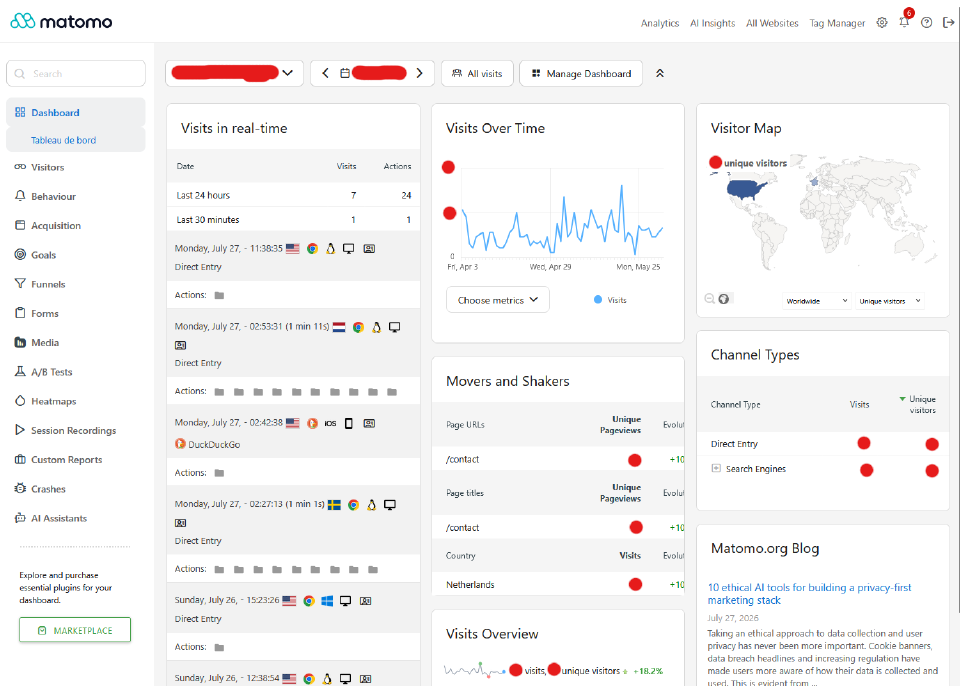
User journey: the actual path visitors take, page by page — useful for spotting the friction points discussed earlier.
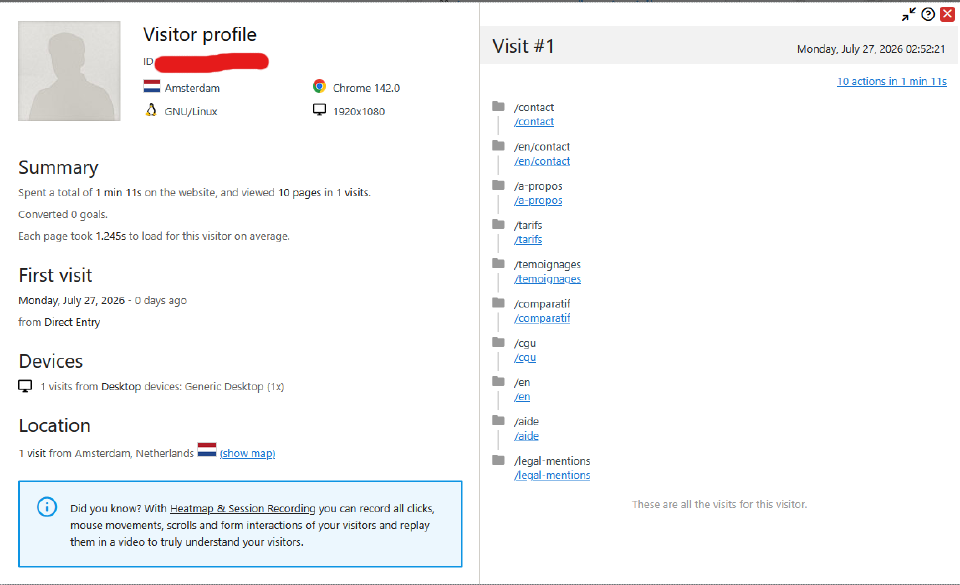
Custom events: actions tracked via
trackEvent(like the signup CTA click from our example), with their volume over time.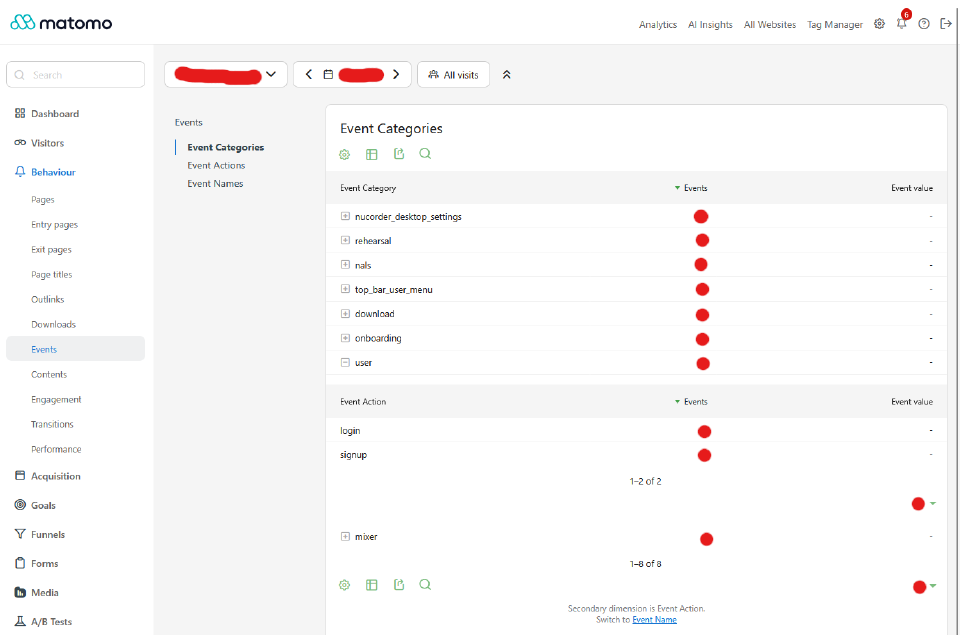


Nothing complicated to read there: the same concepts as with Google Analytics or Amplitude, but with your data staying where it belongs — with you.
What I take away
Application tracking is neither a gimmick nor a surveillance tool: it’s a way to make decisions based on facts rather than intuition, whether that means fixing a flow that’s causing drop-off, catching a bug, or questioning whether a feature is worth keeping. The vocabulary (track, identify, traits, identifier) is simple once demystified, and its technical implementation stays approachable too — provided you properly decouple tracking from the rest of your application code.
What remains is the question of data ownership. Between American SaaS solutions and a self-hosted option like Matomo, the choice isn’t just technical: it’s also about keeping control of your data, within a compliance framework that’s easier to respect.
Thinking about tracking on your application?
If you’re considering setting up this kind of solution, if your current tracking’s compliance is raising questions, or simply if this article gave you some ideas, feel free to reach out!

